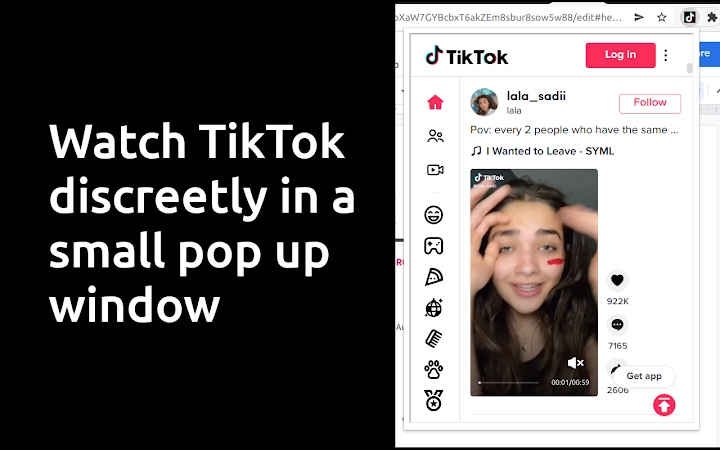

Discreet TikTok Viewing in a Mini Window
Overview
The software provides a discreet way to view TikTok content directly within a small, floating window, allowing users to stay focused on their primary tasks. Designed for individuals who want to take brief, uninterrupted breaks without switching contexts, it enables seamless access to TikTok videos without leaving the current webpage. This is particularly useful during work hours, meetings, or any scenario where full-screen video consumption is inappropriate or impractical.
Target users include remote workers, students, and professionals seeking quick mental resets without disrupting workflow. The tool operates entirely within the browser environment, requiring no installation beyond a Chrome extension. While the developer is not specified, the software’s functionality suggests a focus on simplicity and minimalism in digital productivity tools.
Real-world usage scenarios include checking trending videos during a coffee break, reviewing content for creative inspiration, or simply enjoying a moment of entertainment without distraction. The software’s lightweight nature and zero cost make it accessible for a broad audience across Windows, Mac, and Linux platforms.
Key Features & Capabilities
- Mini Pop-up Window – Displays TikTok content in a compact, floating browser window that can be positioned anywhere on screen.
- Keyboard Navigation – Use up and down arrow keys to scroll through videos quickly, enabling hands-free browsing.
- Context Preservation – Allows users to remain on their current page while viewing TikTok, ideal for multitasking.
- Quick Access via Toolbar Icon – Launch the mini window with a single click from the browser toolbar.
- Free and Lightweight – No cost to use and occupies only 2.1 MB of storage space.
Each feature supports efficient, low-friction engagement. For example, the keyboard navigation allows users to browse content without reaching for the mouse, which enhances workflow continuity. The mini window ensures that users do not lose their place in documents or applications. The ability to pin the extension further streamlines access, making it ideal for repeated use throughout the day.
User Interface, Workflow & Performance
The user interface is minimal and focused, centered around a single toolbar icon that triggers the pop-up window. Once activated, the interface displays TikTok’s content in a small, resizable window that can be moved freely across the screen. Navigation is intuitive, relying on standard keyboard inputs, which reduces cognitive load and improves accessibility.
Workflow efficiency is high, as the entire process—from launching the window to browsing videos—requires just a few interactions. The software integrates directly into the Chrome browser, avoiding the need for separate application windows or complex setup steps. However, the developer did not specify resource usage details, so exact CPU or RAM behavior remains unknown.
Performance observations are based on general software behavior patterns. The mini window may take a few seconds to load, which is typical for browser-based pop-ups. Stability appears consistent with standard extensions, though prolonged use may depend on browser performance and background processes. No reported crashes or errors were mentioned in the provided information.
Compatibility & System Requirements
The software is compatible with Windows, Mac, and Linux operating systems, making it accessible across major desktop platforms. It functions as a Chrome extension, requiring the Google Chrome browser to operate. The installation size is 2.1 MB, indicating a lightweight footprint that minimizes impact on system resources.
Exact system requirements were not listed. Compatibility with specific Chrome versions is not specified, nor are any hardware prerequisites. The developer did not provide additional system requirements. Users should ensure their browser is up to date to maintain optimal functionality.
Pros and Cons
Pros
- Free to use with no hidden costs
- Lightweight at just 2.1 MB
- Discreet viewing during meetings or work sessions
- Keyboard navigation enhances speed and ease
- Works across Windows, Mac, and Linux
Cons
- No option to resize the window beyond default size
- Video enlargement is not supported in the pop-up
- Delayed loading time for the mini window
- Dependent on Chrome browser only
- Limited to TikTok content
FAQ Section
Is this software compatible with all browsers?
The software is designed to work exclusively with the Google Chrome browser. It is not available for other browsers such as Firefox, Edge, or Safari.
Is the software safe to use?
As a Chrome extension, the software operates within the browser’s security framework. It does not collect personal data or install additional components beyond the extension itself. However, users should only install extensions from trusted sources.
How often are updates released?
Update frequency was not specified. Users should check the Chrome Web Store for new versions or automatic updates.
What type of license does it use?
The software is completely free and does not require a license key or subscription. It is distributed under a free-to-use model.
Can I use it offline?
No, the software requires an active internet connection to load and display TikTok content. It cannot function without access to the web.
Final Thoughts + CTA
This lightweight, free tool offers a practical solution for users who want to enjoy TikTok content without disrupting their workflow. Its discreet pop-up design, keyboard navigation, and cross-platform support make it a valuable addition for professionals and students seeking short, focused breaks. While it has limitations—such as browser dependency and no video enlargement—it delivers on its core promise with minimal friction.
For those looking to balance productivity with brief entertainment, this extension stands out as a smart, no-cost option. Its simplicity and efficiency are ideal for users who value time and privacy during digital breaks.
Download Discreet TikTok Mini Window now







